TL;DR
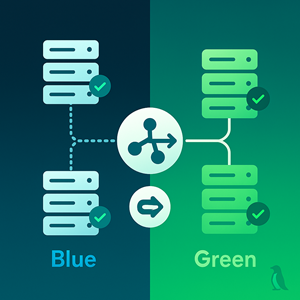
Blue/green keeps two production‑grade environments—Blue (serving) and Green (new)—behind an ALB. You fully warm and verify Green, then switch the ALB listener’s default action from TG‑Blue to TG‑Green for an instant, reversible cutover. Success hinges on: realistic readiness checks (probe real dependencies), pre‑scaled capacity, session/state handling, backward‑compatible data changes, clear go/no‑go metrics, and a pre‑decided rollback that is just another traffic switch. Use Instance Refresh for in‑place updates within a color; use blue/green when you need version isolation and fast rollback.
Where the idea comes from (and the name)
The blue/green pattern emerged from early continuous delivery practices in the mid‑to‑late 2000s, when teams were trying to make releases boring instead of adrenaline events. The idea appeared in books, conference talks, and industry blogs describing how to keep two production‑grade environments side by side so you could test one privately and then “flip the sign” for customers. The color names were intentionally arbitrary—Blue and Green were chosen to avoid implying a hierarchy like primary/secondary or old/new. Using colors made it easier for cross‑functional teams (ops, dev, QA, product) to talk about a cutover unambiguously: “Green is healthy; we’ll switch at 10:15; Blue stays warm for 30 minutes.”
Over time, the pattern spread beyond web apps to APIs, data processing clusters, and even mobile backends—anywhere a quick, reversible switch beats slow, fragile in‑place upgrades.
What problem it solves
Traditional in‑place releases are gradual by nature. Half the fleet may run the new code while the rest runs the old; failures can be gray and lingering, and rollback often means redeploying under pressure. Blue/green reframes the problem: you build a fully formed alternative (Green) and then move traffic in one binary, auditable, reversible step. The old environment (Blue) remains intact, giving you a shock‑absorber for mistakes, runtime surprises, or external failures.
This helps when you need reproducibility, change control, and clear separation of concerns—especially for large upgrades (framework jumps, OS/agent changes) where the risk isn’t just the code but the ecosystem around it.
When this pattern is a good fit
Choose blue/green when uptime and confidence matter more than squeezing every last dollar out of capacity during a release. It shines for public websites and APIs, internal platforms with strict SLAs, and regulated systems with tight change windows. It’s also helpful when you want to quarantine side effects like cache warm‑up, JIT compilation, or feature‑flag seeds before customers arrive.
Conversely, if your workload is batch/offline, or your risk lives mostly in stateful migrations, blue/green alone won’t eliminate the hard parts—you’ll need a migration strategy that’s safe to run while both colors exist.
Cloud‑native building blocks (AWS ASG + ALB)
At a conceptual level, blue/green on EC2 uses a traffic director (the ALB) and two equal fleets (ASGs) that register to two separate target groups. The ALB always points its default action at exactly one target group; the moment you switch that pointer you’ve effectively changed which color is live.
Example: Suppose ASG‑Blue currently serves www.example.com via target group TG‑Blue. You create ASG‑Green, warm it until every instance is healthy in TG‑Green, then flip the ALB listener’s default action to point at TG‑Green. Customers seamlessly land on Green; Blue keeps running so you can watch metrics and, if needed, flip back.
This same idea also scales: you can run one color per region, or use Route 53 weighted DNS to feather in traffic region‑by‑region while keeping the ALB switch inside each region for instant cutovers.
Critical considerations (the substance of a safe blue/green)
1) Health & readiness that reflect real dependencies
A passing health check must mean the user journey can succeed. Don’t stop at “process is up.” Probe the database, cache, config store, and any third‑party services that are on the critical path. If those aren’t ready, the instance isn’t ready. Tune timeouts and thresholds to match real cold‑start behavior so Green doesn’t flap between healthy and unhealthy while warming.
Example: For a storefront, a meaningful readiness probe might check: can we read the product catalog, open a checkout session in Redis, and fetch a signed URL from the payment gateway sandbox?
2) Capacity headroom before the switch
Green should be scaled to handle peak at the time you plan to switch. If you rely on auto‑scaling to catch up during cutover, you risk brief brownouts exactly when you’re most exposed. Replicate scheduled/predictive rules to the Green ASG so it doesn’t start underweight.
Example: If Blue handles ~900 RPS around lunchtime, pre‑scale Green to the same or slightly higher capacity and validate p95 latency under a warm cache.
3) Sessions, stickiness, and in‑flight requests
If you use ALB stickiness or server‑side sessions, confirm that session stores are shared or migrated so users don’t lose carts or auth after the switch. Set a deregistration delay long enough for reports/downloads to finish on Blue. A short “brown‑out” phase where Blue only drains existing connections avoids abrupt terminations.
4) Data & schema changes (the sharp edges)
Prefer back‑compatible migrations using the expand → deploy → contract model. Both colors should be able to read/write during the overlap. Avoid destructive changes at the exact moment of the traffic switch; if you must, rehearse recovery and know how you’ll unwind writes (dual‑write with a kill switch, write‑blocking windows, or queuing).
Example: Add columns and write to both schemas during Green bake; only remove legacy columns after Blue is retired and backfills are complete.
5) Observability and release guards
Decide beforehand which signals are the gatekeepers—typically target 5xx rate, p95 latency, and one or two business KPIs (sign‑in success, checkout success). Tag logs/metrics with the Color so dashboards clearly show Blue vs. Green. Automate the go/no‑go check but keep a manual “big red button” for emergencies.
6) Rollback policy that’s actually fast
Rollback should mean switch the pointer back, not redeploy. Keep Blue running for a defined bake window (e.g., 15–30 minutes) after cutover. Agree on thresholds and authority in advance so there’s no debate during an incident.
7) Automation & guardrails
Put the repeatable parts in your pipeline—warming Green, verifying alarms are OK, switching traffic, starting a bake timer, posting an audit note. Equally, document a clear manual path for when automation refuses to proceed (e.g., alarms not OK).
8) Security & compliance
Both colors must meet the same security baseline: patched AMIs, least‑privilege IAM roles, secrets sourced the same way. Watch for expiring tokens during long bakes and make sure each color can rotate independently.
9) Cost and cleanup
You temporarily run two full environments. Budget for it and plan the cleanup: scale down the old color, de‑register targets, and archive the exact AMI/launch template that just served production so you can reproduce it later.
10) Multi‑AZ/region and DNS considerations
Inside a region, ALB switching is near‑instant and avoids DNS caching. For cross‑region control or gradual geo rollouts, combine weighted DNS at the top with ALB color switching within each region.
11) Working with Instance Refresh
Use Instance Refresh for in‑place maintenance inside a color (kernel, agent, minor runtime). Use blue/green when you want version isolation and a rapid, binary rollback. They are complementary tools.
Anti‑patterns to avoid
Even well‑designed blue/green efforts stumble on a few recurring traps. Here are the big ones and how to sidestep them.
“It passed health check—ship it.”
A shallow probe (e.g., returning 200 from /) only proves a process is listening, not that the user journey can succeed. If the app can’t reach its database, can’t read configuration, or fails to create a session, it isn’t ready—no matter what the ALB sees. Build a readiness check that exercises the minimum critical path (config read, DB ping, cache access, dependent API call to a canary endpoint). Tune timeouts/thresholds so instances don’t flap while warming.
Schema flips at cutover time.
Trying to change the data model at the exact moment you switch colors combines two risky moves. Use the expand → deploy → contract sequence: ship additive changes first (new columns, dual‑write), cut over traffic, then (after verification and backfills) remove the old shape. If destructive changes are unavoidable, plan a write‑quiesce window or a reversible guard (feature flag or queued writes) and rehearse recovery.
Switching under load without pre‑scaling.
If Green must scale up during the switch, you’re courting brownouts while caches are cold and JIT compilers are waking up. Pre‑scale Green to expected peak and, if possible, prime caches using synthetic traffic. Mirror any scheduled/predictive rules from Blue so Green isn’t born undersized.
No single‑metric truth.
In an incident, ambiguity costs minutes. Agree in advance on the few leading indicators that decide go/no‑go—typically target 5xx rate, p95 latency, and one business KPI like sign‑in or checkout success. Tag metrics and logs by Color so dashboards show Blue vs. Green side‑by‑side. Document who is authorized to call a rollback and the exact threshold that triggers it.
Ignoring in‑flight requests and client state.
Cutovers can drop long downloads or invalidate sticky sessions if you don’t account for them. Set a realistic deregistration delay so Blue drains gracefully, and confirm session stores/cookies survive the switch (shared store, compatible serializers, or stateless tokens). Consider a brief drain‑only window where Blue accepts no new requests but continues serving active ones.
Drift between colors.
If Blue and Green are built differently (AMI patch level, agent versions, IAM roles), you’re testing more than your application. Build both colors from the same IaC pipeline and verify baselines (CIS hardening, secrets sourcing, logging/telemetry) before you declare Green eligible for traffic.
Want help tailoring this for your stack? Reliable Penguin can review health checks, migration plans, and rollback thresholds to make blue/green boring and safe.




