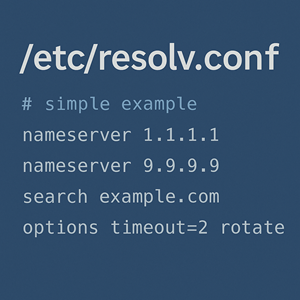
On most Unix-like systems, /etc/resolv.conf is the tiny text file that quietly decides how your box looks up hostnames. If DNS is “the phone book of the internet,” then resolv.conf is the resolver’s address book: where to ask, how to ask, and what shortcuts to use.
Wait, is it resolve.conf or resolv.conf?
First things first: the filename is /etc/resolv.conf — no “e” at the end of resolv. The name comes from the classic “resolver” library, not from the English verb “resolve.”
You’ll see “resolve.conf” in typos all over the internet (and in shell histories), but the real file is resolv.conf.
What /etc/resolv.conf actually does
On a typical Linux system, when a process calls getaddrinfo() to resolve a hostname like app.example.com, the C library’s resolver code decides how to perform the lookup. One of the key inputs for that decision is /etc/resolv.conf.
In broad strokes:
- The application asks the C library to resolve a name.
- The C library checks
/etc/nsswitch.confto see what mechanisms to use (DNS,/etc/hosts, LDAP, etc.). - If DNS is involved, the resolver reads
/etc/resolv.confto learn:- Which DNS servers to talk to.
- Which search domains to append.
- What resolver tunables (timeouts, retries, etc.) to use.
So /etc/resolv.conf doesn’t run a daemon; it’s just a config file that tells the resolver library how to talk to DNS.
Historical background: from BIND to glibc to systemd
Originally, the resolver logic lived in the BIND resolver library. Over time, that code was imported into the GNU C Library (glibc), which is what most Linux systems use today. The manual pages for resolv.conf still reflect that legacy: they describe the resolver routines and the file format for /etc/resolv.conf.
For many years, admins simply edited /etc/resolv.conf directly on each host to point at:
- ISP DNS servers
- Internal corporate resolvers
- Caching resolvers like
dnsmasqorbindon127.0.0.1
Modern systems changed the story:
- NetworkManager, resolvconf / openresolv, and similar tools started auto-generating
resolv.confbased on interface configuration. - systemd-resolved arrived and often owns
/etc/resolv.confvia a symlink to a “stub” file in/run/systemd/resolve/.
That’s why on many modern distros the file contains big comments like “DO NOT EDIT THIS FILE BY HAND – YOUR CHANGES WILL BE OVERWRITTEN.”
Basic structure of /etc/resolv.conf
At its core, resolv.conf is a simple, line-oriented file with a handful of keywords. The most important are:
nameserversearch/domainoptions
Comments start with #. Whitespace is flexible (spaces or tabs).
A very minimal example:
|
1 2 3 4 5 6 7 8 9 |
# /etc/resolv.conf - simple example nameserver 1.1.1.1 nameserver 9.9.9.9 search example.com corp.example.com options timeout=2 attempts=2 rotate |
Let’s break those down.
nameserver: where to send DNS queries
Each nameserver line gives an IP address of a DNS resolver:
|
1 2 3 |
nameserver 192.0.2.53 nameserver 198.51.100.53 |
Key points:
- Order matters: the resolver tries them in the order listed.
- Traditional glibc limits this to three nameservers; extra entries are ignored.
- These are recursive resolvers, not authoritative servers. Think “what my host asks,” not “who hosts example.com’s zone.”
On a system managed by systemd-resolved, you’ll often see:
|
1 2 3 |
nameserver 127.0.0.53 # or sometimes 127.0.0.1 |
That means the local systemd stub is doing the actual upstream querying and caching.
search and domain: building full hostnames
The search (and historical domain) directives define which suffixes get appended to bare hostnames:
|
1 2 |
search dev.example.com corp.example.com |
If you run ping web01, the resolver will try:
web01.dev.example.comweb01.corp.example.comweb01(as-is), depending on resolver behaviour.
Notes:
- Only one effective search list is used. With multiple
search/domainlines, the last one wins. domainis essentially an older, single-domain variant ofsearchand is considered obsolete for general use.- Older glibc versions limit you to six domains and 256 characters total in the search list; newer ones lift that limit, but keeping it short is still good practice.
Search domains are very handy on internal networks, but they can:
- Generate lots of extra queries if misconfigured.
- Leak internal domain names out to public resolvers, which has privacy implications.
options: tuning resolver behaviour
The options line exposes various knobs supported by the resolver. Common ones include:
timeout:n– Seconds to wait for a response from a nameserver before trying the next one.attempts:n– How many times to retry queries before giving up.rotate– Round-robin through nameservers instead of always starting with the first one.ndots:n– Controls when the resolver treats a name as “already fully qualified” vs “apply search domains.”
Example:
|
1 2 |
options timeout=1 attempts=3 rotate ndots=2 |
This can reduce perceived latency on flaky networks or help you load-balance among multiple resolvers.
How /etc/resolv.conf is managed today
1. Directly managed / static file
On minimal or older systems, /etc/resolv.conf is just a normal file:
- Edited directly by the admin.
- Persisted across reboots (assuming no network manager overwrites it).
This is still common on small servers, containers, or chroot environments.
2. Managed by resolvconf / openresolv or NetworkManager
On some distros, resolv.conf is clearly marked as managed:
|
1 2 3 4 |
# Dynamic resolv.conf(5) file for glibc resolver(3) generated by resolvconf(8) # DO NOT EDIT THIS FILE BY HAND -- YOUR CHANGES WILL BE OVERWRITTEN nameserver 127.0.1.1 |
In that setup:
- The network stack (NetworkManager, ifupdown scripts, DHCP client, etc.) feeds DNS data into
resolvconf. resolvconfcomposes/etc/resolv.conffrom those inputs.
If you need to change DNS, you edit the source — e.g., NetworkManager connection settings — not /etc/resolv.conf itself.
3. Managed by systemd-resolved
On many modern systems, /etc/resolv.conf is a symlink:
|
1 2 3 |
$ ls -l /etc/resolv.conf /etc/resolv.conf -> /run/systemd/resolve/stub-resolv.conf |
That stub file usually contains:
|
1 2 3 4 5 6 |
# This file is managed by systemd-resolved. Do not edit. # This is a dynamic resolv.conf file for connecting local clients to the # internal DNS stub resolver of systemd-resolved. nameserver 127.0.0.53 search example.com |
Here:
- Applications talk to the local stub on
127.0.0.53. systemd-resolveddecides which upstream servers to contact, possibly per interface, with caching, split DNS, DNSSEC, and more.
Again, to change DNS, you adjust:
- Network configuration (
.networkfiles, NetworkManager, etc.), or resolved.confand related systemd settings,
not the stub symlink target itself.
Common admin use cases
Even with all the automation, understanding resolv.conf is still very practical.
1. Pointing a host at specific DNS resolvers
You might want to:
- Use a corporate recursive resolver:
123nameserver 10.0.0.10nameserver 10.0.0.11 - Use public resolvers:
123nameserver 1.1.1.1nameserver 9.9.9.9 - Use a local caching resolver:
12nameserver 127.0.0.1
How you do this depends on who “owns” resolv.conf (static file, resolvconf, systemd-resolved, NetworkManager, etc.).
2. Configuring internal search domains
On an internal network, users may expect ssh web01 to “just work” without typing web01.dev.example.com.
That’s what the search directive is for:
|
1 2 |
search dev.example.com corp.example.com |
With this in place, tools like ping, ssh, and curl will automatically try the fully qualified variants before giving up.
3. Troubleshooting DNS issues
When DNS is flaky, resolv.conf is one of the first files to inspect:
- Is
/etc/resolv.confa regular file or a symlink to somewhere unexpected? - Are the
nameserverIPs reachable from this host? - Is a local stub (127.0.0.1 / 127.0.0.53) actually running?
You can pair that with tools like:
|
1 2 3 |
dig example.com getent ahosts example.com |
to see how the system is resolving names end-to-end.
Best practices and common pitfalls
A few practical guidelines for day-to-day operations:
Don’t fight your network manager
If resolv.conf announces that it’s generated and will be overwritten, believe it. Configure DNS via:
- NetworkManager profiles
- DHCP server options
- systemd network units /
resolved.conf resolvconf/openresolvinput files
rather than trying to “force” changes into resolv.conf.
Keep the nameserver list short and sane
- Stick to reliable resolvers that are reachable from the host’s network.
- Remember that traditional glibc only looks at the first three nameservers.
- Don’t sprinkle random public resolvers after internal ones if you rely on internal-only zones — that can lead to confusing partial failures.
Be cautious with search domains
- Use search domains primarily for internal, trusted namespaces.
- Keep the list modest to avoid latency and unnecessary query volume.
- Remember that every failed lookup might be tried with each search domain in turn (and leak those hostnames externally if you’re using public resolvers).
Know who really owns /etc/resolv.conf
On any given system, one of the most useful mental checklists is:
- Is
/etc/resolv.confa regular file or symlink? - If symlink, what is the target (
stub-resolv.conf,/run/systemd/resolve/resolv.conf, something else)? - Which service or tool is responsible for generating that target?
Once you know that, you know where to make persistent changes.
Summary
- The file is
/etc/resolv.conf, notresolve.conf. - It configures the C library resolver, telling it which DNS servers to query, which search domains to use, and how to tune timeouts and retries.
- Historically it was edited by hand; today it’s often auto-generated by tools like
resolvconf, NetworkManager, orsystemd-resolved. - For day-to-day sysadmin work, understanding the keywords (
nameserver,search,domain,options) and who owns the file on your distro is crucial for debugging DNS issues and designing clean network configs.




