When you first start working with systemd, you usually focus on the basics: ExecStart, Restart, maybe WantedBy. But systemd has a powerful feature that often flies under the radar: unit conditions.
Unit conditions let you say things like:
- “Only run this service if a certain file exists.”
- “Don’t start this unit if we’re in a container.”
- “Skip this job if a particular mount point is missing.”
In this post, we’ll focus on ConditionPathExists and a few related options, and show practical examples of how you can use them in real infrastructure — including a simple clone guard pattern based on a marker file such as:
|
1 2 |
ConditionPathExists=!/etc/host_is_clone |
What are systemd conditions?
Conditions are directives under the [Unit] section of a systemd unit file. They’re evaluated before the unit is started. If any condition fails, systemd skips the unit entirely.
Key points:
- They don’t run a shell or external script (except
ExecCondition, which is separate and lives under[Service]). - They’re cheap and fast.
- They’re perfect for environment-aware behavior (VM vs bare metal, production vs clone, etc.).
If a condition fails, systemd logs that the unit was skipped, not “failed” — which is often exactly what you want.
ConditionPathExists basics
The most common file-based condition is:
|
1 2 |
ConditionPathExists=/some/path |
This means:
Only start this unit if
/some/pathexists.
You can invert it with !:
|
1 2 |
ConditionPathExists=!/etc/host_is_clone |
Meaning:
Only start this unit if
/etc/host_is_clonedoes not exist.
This is a great pattern for clone guards: drop a file in cloned environments to prevent certain services from running (backups, monitoring jobs, email senders, etc.).
Example: Clone guard for an endpoint monitor
Imagine a monitoring script that should never run on a cloned VM (like a staging copy of production).
|
1 2 3 4 5 6 7 8 9 10 11 12 13 14 15 16 17 18 |
# /etc/systemd/system/app-health-check.service [Unit] Description=Application health check After=network-online.target Wants=network-online.target ConditionPathExists=!/etc/host_is_clone [Service] Type=simple User=root ExecStart=/usr/local/bin/app_health_check.sh -c /etc/app-health-check/config.json WorkingDirectory=/ Restart=on-failure RestartSec=5s [Install] WantedBy=multi-user.target |
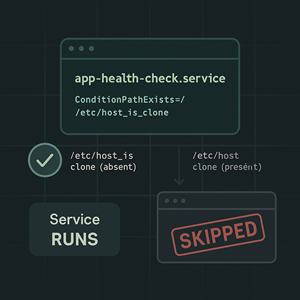
- On production:
/etc/host_is_clonedoes not exist → service runs as normal. - On a cloned system: create
/etc/host_is_clone→ systemd sees the condition fail and skips the service whenever something tries to start it (including timers).
The timer doesn’t need to be aware of the clone state at all.
Other useful path conditions
There are several related path conditions you can mix and match.
ConditionPathExistsGlob=
Like ConditionPathExists, but supports globbing:
|
1 2 |
ConditionPathExistsGlob=/etc/httpd/conf.d/*.conf |
Only run this unit if any matching file exists.
Good for: enabling services only if there’s at least one config snippet present.
ConditionPathIsDirectory=
Checks if the path exists and is a directory:
|
1 2 |
ConditionPathIsDirectory=/var/lib/postgresql |
Good for: services that only make sense when a data directory exists (e.g., data nodes, worker roles).
ConditionPathIsMountPoint=
Checks if the path is a mount point:
|
1 2 |
ConditionPathIsMountPoint=/backup |
Don’t start the backup job unless the backup volume is actually mounted.
Great for avoiding the classic mistake of backing up to /backup that silently became part of / because the mount failed.
ConditionPathIsReadWrite=
Checks whether a filesystem path is writable:
|
1 2 |
ConditionPathIsReadWrite=/var |
Useful when booting in read-only or rescue scenarios where some services should not start if the filesystem is not writable.
Beyond paths: other handy conditions
While we’re here, a few non-path conditions that are often useful in real systems:
ConditionVirtualization=
Control services depending on whether you’re in a VM, container, or bare metal:
|
1 2 |
ConditionVirtualization=!container |
Only start this service outside of containers.
Or:
|
1 2 |
ConditionVirtualization=kvm |
Only start if running under KVM.
ConditionFirstBoot=
Run something only on the very first boot of the system:
|
1 2 |
ConditionFirstBoot=yes |
Paired with WantedBy=multi-user.target, this makes a nice first-boot setup service that initializes config, generates keys, etc., and then never runs again.
ConditionACPower=
For laptops or edge devices:
|
1 2 |
ConditionACPower=true |
Only run this job when plugged into AC.
Great for heavy maintenance tasks or backups on battery-powered hardware.
Conditions vs ExecCondition
You’ll also see ExecCondition mentioned in systemd docs, but it lives under [Service], not [Unit]. For example:
|
1 2 3 4 |
[Service] ExecCondition=/usr/bin/test ! -e /etc/disable-monitoring ExecStart=/usr/local/bin/do-stuff.sh |
Differences vs ConditionPathExists:
ExecConditionruns an actual command. If it exits with status 0, service continues. Non-zero meansExecStartis skipped.- When an
ExecConditionfails, the unit is typically marked as failed in systemd. ConditionPathExistsis internal to systemd and doesn’t require external commands; failed conditions mark the unit as skipped, not failed.
Rule of thumb:
- Use
Condition*directives when you can. They’re clean, fast, and don’t clutter logs with “failures” for expected skip cases. - Use
ExecConditionwhen you truly need custom logic (complex checks, scripts, multiple files, etc.).
Practical examples
Here are a few scenarios you might encounter in hosting or managed-services environments.
1. Backup job only when backup volume is mounted
|
1 2 3 4 5 6 7 8 9 10 11 |
[Unit] Description=Nightly backup job ConditionPathIsMountPoint=/backup [Service] Type=oneshot ExecStart=/usr/local/sbin/run-backup.sh [Install] WantedBy=multi-user.target |
Even if a timer triggers this daily, nothing will run if /backup isn’t mounted — which helps avoid writing backups to the wrong place.
2. Disable email sending on clones
|
1 2 3 4 5 6 7 8 |
[Unit] Description=Outbound email queue processor ConditionPathExists=!/etc/host_is_clone [Service] Type=simple ExecStart=/usr/local/bin/process-mail-queue |
On production, there’s no /etc/host_is_clone file, so emails flow. On a copied VM used for testing, you touch /etc/host_is_clone and know that even if the service or its timer is active, it will never process outbound mail.
3. Run database migrations only on first boot
|
1 2 3 4 5 6 7 8 9 10 11 12 13 |
[Unit] Description=Run app database migrations on first boot After=network-online.target Wants=network-online.target ConditionFirstBoot=yes [Service] Type=oneshot ExecStart=/usr/local/bin/app-migrate.sh [Install] WantedBy=multi-user.target |
This helps bake migrations into image provisioning while ensuring they only run once.
4. Optional services based on config presence
|
1 2 3 4 5 6 7 8 |
[Unit] Description=Customer-specific integration sync ConditionPathExists=/etc/integrations/customer-foo.conf [Service] Type=simple ExecStart=/usr/local/bin/customer-foo-sync |
You can ship the unit to all hosts, but it only runs on those where the config file has been deployed.
Observing conditions in action
When conditions cause a unit to be skipped, you’ll see it in systemctl status and the journal.
Example:
|
1 2 |
systemctl status app-health-check.service |
Might show something like:
ConditionPathExists=!/etc/host_is_clone was not met
And nothing else happens — which is exactly what you want for clone guards and environment-specific jobs.
Wrapping up
Systemd conditions are a small feature with a big impact:
- They let you build environment-aware services without shell wrappers.
- They keep logs cleaner by marking units as skipped, not failed, when they’re not supposed to run.
- They are perfect for patterns like:
- Clone guards (
ConditionPathExists=!/etc/host_is_clone) - Backup safety (
ConditionPathIsMountPoint=/backup) - First-boot initialization (
ConditionFirstBoot=yes) - Virtualization- or battery-aware behavior (
ConditionVirtualization=,ConditionACPower=)
- Clone guards (
If you’re already using systemd timers and services, sprinkling in a few well-chosen conditions can make your infrastructure more robust, safer, and easier to reason about — especially in environments with clones, staging copies, and mixed roles.




