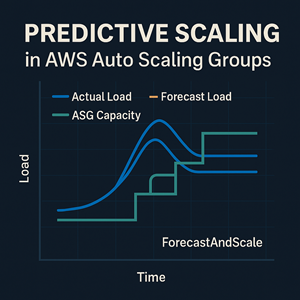
If you’ve ever watched an Auto Scaling Group scramble during the morning rush—instances launching late, warmups dragging, queues backing up—you already know the core problem with purely reactive scaling: by the time CloudWatch alarms fire, your users have already felt it.
AWS Predictive Scaling is built for that exact scenario. It studies historical load patterns, forecasts what’s coming, and scales out ahead of demand so capacity is ready when the spike arrives.
It’s not a replacement for dynamic scaling, though. Predictive scaling is best thought of as “set the baseline in advance,” while dynamic scaling handles surprises and scale-in behavior.
What is a Predictive Scaling policy?
A Predictive Scaling policy is a scaling policy type for Amazon EC2 Auto Scaling Groups that forecasts future capacity needs based on a CloudWatch metric you choose.
It’s especially helpful when your workload is:
- Cyclical (weekday business hours, nightly lulls, weekend drops)
- Recurring (batch jobs, periodic processing)
- Slow to start (boot + config + registration time makes reactive scaling feel late)
The goal is simple: launch instances before the load arrives so you don’t have to permanently overprovision “just in case.”
How Predictive Scaling works
Predictive scaling has a fairly straightforward lifecycle. Understanding it will help you roll it out safely.
It needs history to learn your patterns
Predictive scaling requires at least 24 hours of metric history before it can produce forecasts. It generally improves as it sees more data, and AWS recommends around two weeks of history to get the most reliable results.
It generates a near-term forecast and refreshes regularly
Once enabled, AWS analyzes up to the past 14 days of data and generates an hourly forecast for the next 48 hours. That forecast is refreshed every 6 hours as new data arrives and the model updates.
It starts in “ForecastOnly” mode
When you first create a predictive scaling policy, it runs in ForecastOnly mode. That means it produces the forecast and capacity recommendations, but it does not actually scale your Auto Scaling Group.
This is intentional: you should review and validate the forecast against reality before allowing it to change production capacity.
In “ForecastAndScale,” it scales out—but not in
Once you switch the policy to ForecastAndScale, Auto Scaling can scale the group out based on forecasted demand.
However, predictive scaling does not scale your group in when demand drops. That means you still need dynamic scaling (most commonly, a target tracking policy) to handle scale-in and unexpected traffic changes.
You can pre-launch to account for warmup time
Predictive scaling can launch instances earlier than the start of the forecast hour by using a buffer time (often shown in the console as “Pre-launch instances”).
This is where predictive scaling can really shine. If your instances take time to boot, download configs, register in a target group, or warm caches, pre-launching can be the difference between smooth scaling and a visible performance dip.
Picking the right metric
Predictive scaling is only as useful as the metric you feed it. The best metric is the one that most directly represents real load on your service.
A few practical guidelines:
- If your application is behind an Application Load Balancer, request count per target is often a strong choice because it reflects actual incoming demand, not a side effect like CPU.
- CPU utilization can work well if your workload is consistently CPU-bound, but it can be noisy depending on garbage collection, background jobs, request mix, and uneven traffic distribution.
- Custom metrics are often the best option for asynchronous systems: queue depth, jobs-per-minute, active sessions, or a metric-math expression that produces a cleaner “load” signal.
When in doubt, run multiple policies in ForecastOnly mode using different metrics and compare which forecast tracks reality more closely.
A safe rollout playbook
Predictive scaling is easy to enable and hard to trust without data. A structured rollout helps you avoid surprises.
Start with ForecastOnly and compare options
A practical approach is to create more than one predictive scaling policy in ForecastOnly mode. Try different metrics and targets, then compare which one aligns with what your system actually needs.
You can only have one predictive scaling policy actively scaling a group at a time, but nothing stops you from evaluating multiple candidates first.
Review recommendations before going live
The EC2 Auto Scaling console provides capacity recommendations and graphs that let you compare forecast load and actual load. Spend a few days watching how the forecast behaves—especially during your busiest recurring periods.
Pair predictive scaling with dynamic scaling
The most reliable setup is treating predictive scaling as a baseline planner and dynamic scaling as a real-time controller:
- Predictive scaling gets you ahead of known peaks.
- Dynamic scaling handles unexpected surges and enables scale-in when demand drops.
A common pairing is:
- Predictive scaling in ForecastAndScale mode
- A target tracking policy for the same group (for real-time scale-out and scale-in)
Guardrails: min/max capacity and what happens when forecasts exceed max
Predictive scaling still respects your Auto Scaling Group limits. If your maximum capacity is too low, the group can’t scale high enough—even if the forecast says it should.
AWS provides a setting that lets predictive scaling temporarily exceed the ASG’s max capacity when forecasts predict the group will need more than the configured maximum.
This can be very effective for predictable “big days” (product launches, monthly processing, Monday morning spikes), as long as you’re comfortable with:
- The additional cost
- Any EC2 instance quota and subnet capacity constraints
- Downstream dependencies (databases, caches, third-party APIs) that can become the new bottleneck
Monitoring: don’t fly blind
Two habits make predictive scaling far more trustworthy:
- Compare forecasts vs actuals. Use the console and CloudWatch graphs to evaluate whether the policy tracks your real peaks and valleys.
- Watch service-level outcomes. Forecast accuracy is nice, but your SLO signals—latency, error rate, queue depth, saturation—are what determine whether scaling is truly working.
A quick AWS CLI example
Predictive scaling policies can be configured via the AWS CLI using put-scaling-policy, with a predictive scaling configuration that includes a metric specification and target value.
In practice, you’ll typically start in ForecastOnly, evaluate the forecast, and then change to ForecastAndScale once you’re confident.
|
1 2 3 4 5 6 7 8 9 10 11 12 13 |
{ "MetricSpecifications": [ { "TargetValue": 1000, "PredefinedMetricPairSpecification": { "PredefinedMetricType": "ALBRequestCount", "ResourceLabel": "app/my-alb/.../targetgroup/my-tg/..." } } ], "Mode": "ForecastAndScale" } |
When Predictive Scaling is a bad fit
Predictive scaling isn’t magic. It performs best when demand is repeatable.
It’s usually not the right first tool when:
- Demand is spiky and non-repeating (news-driven, viral, one-off events)
- Your system recently changed shape (major releases, caching changes, new customer onboarding)
- The load metric is mostly noise, or doesn’t correlate well with the capacity you actually need
In those cases, focus on target tracking, faster scale-out behavior (warm pools, faster AMIs, smaller instance types), and better load metrics first. Then revisit predictive scaling once patterns exist.
Closing thoughts
Predictive scaling is one of the cleanest ways to make Auto Scaling feel “instant” without paying for permanently high capacity. When your load pattern has a rhythm, it can remove a lot of operational stress.
The winning approach is almost always the same: forecast ahead for predictable peaks, and pair it with dynamic scaling to stay resilient when reality doesn’t follow the script.




